AgentProg: Empowering Long-Horizon GUI Agents with Program-Guided Context Management
AgentProg uses program structure, persistent variables, and an execution tree to manage long mobile-task context.
Problem
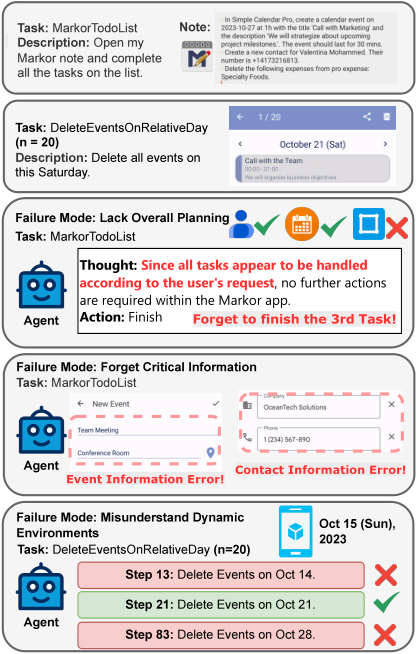
Long repetitive tasks require loops, intermediate values, and recovery from states that differ from the original plan.
Contributions
The system represents tasks as semantic programs and uses their control and data flow to select relevant history.
Method
An LLM generates numbered natural-language steps, branches, loops, and explicit variables, then produces low-level actions for the current program position.
An execution tree selects contextual history, while step identifiers retrieve earlier attempts and variables preserve values independently of context pruning.
A global belief state checks expected progress against new screenshots and supports recovery.
Evaluation
The paper reports 78.0% success on AndroidWorld and 68.4% on the 19-task AW-Extend long-horizon set.
On tasks jointly solved by the compared systems, AgentProg is slower despite shorter dynamic context, so the reported gains do not establish task acceleration.
详细阅读笔记 · Y26-026
本笔记保留阅读时的论文版本、来源与实验边界。文中“你的方案/当前方案”等比较反映当时的讨论;当前研究方向见分类页。自拟例子与复现建议不是作者实验结果。
原论文 · 优先级 P0 · 复核日期:2026-09-07
与当前研究的关系:执行树、变量、步骤ID检索管理当前任务;不维护图标语义词典。用户当前重心为同一任务的历史信息,跨任务经验另列条件,不能把两种记忆的收益混合。
0. 摘要
中文摘要转述,非逐句译文;未确认原始摘要允许完整翻译的开放许可。
AgentProg把长程手机任务写成带变量、分支与循环的自然语言程序,并按照当前执行位置管理上下文。重要数据存入显式变量,已结束循环的无关历史从当前提示移除;系统还持续检查预期状态与实际截图是否一致,以改善长任务中的遗忘、重复和错误累积。
1. 方法动机
平铺的历史越走越长,通用摘要又可能把稍后才需要的联系人或待办项删掉。简单任务清单难表达“先读取未知列表,再对每项操作”的循环,静态计划也无法预知弹窗和应用退出。
作者认为程序结构可明确哪些信息仍被后续步骤使用、哪些执行历史已经无关。把任务逻辑、数据变量与当前环境假设分开管理,可以在压缩历史时保留真正重要的结果。
2. 方法设计
§3.1 Semantic Task Program
先生成自然语言程序。 根据任务构造带编号的步骤、循环、条件与函数,并声明重要变量,例如先读取待办列表存入变量,再遍历每一项。步骤描述目标语义,不要求预先知道全部按钮坐标或严格应用API。
§3.2 STP Generation and Execution
依据当前程序位置生成低层动作代码。 程序计数器指向当前高层步骤;模型结合当前GUI观察,将其翻译为由启动应用、点击、滑动和输入等原子接口组成的Python片段,执行并保存相关结果。这仍是运行时动态定位与动作生成,并非一次编译后全程无模型运行。
§3.2 程序位置更新
执行后单独决定程序位置如何变化。 模型检查反馈,决定进入下一步、重试、循环下一项或切入分支。动作生成与程序计数更新严格交替,控制转移由LLM判断,不是普通解释器固定执行符号条件。
§3.3.1–3.3.2 执行树与步骤检索
按执行树选择当前历史。 顺序、实际走过的条件分支和循环迭代形成执行树;当前提示只保留根到当前节点路径上的相关信息,其他已完成循环历史不全部塞入。再次执行同一程序步骤时,还可按唯一步骤ID检索先前该步骤的动作与结果,帮助保持操作一致。
§3.3.3 Data Flow and Variable Management
让关键数据独立于历史裁剪保存。 显式变量记录列表、日期、用户偏好和中间结果,后续步骤直接引用。程序运行也能创建辅助变量和计数器;即使提取数据时的截图被移出当前上下文,其值仍存在。
§3.4 Global Belief State
在原子执行中维护并核对环境假设。 全局状态保存当前应用、编辑进度及隐藏状态假设;新截图若反驳这些假设,例如编辑表单时突然回到桌面,标记原状态失效并触发恢复。它是可修改的自然语言状态估计,不是能直接观测所有隐藏系统数据的精确状态模型。
自拟例子:把记忆在什么时候使用讲清楚
把三名联系人逐个存入通讯录:第二轮只需当前联系人及保存进度,上一轮所有点击可退出提示;姓名和号码保存在变量中。若号码当时抄错,程序结构自身不能修复,保留原证据才可能重新核验。
模型输入、输出与记忆边界
| 项目 | 本文实际范围 |
|---|---|
| 记忆来源 | 同任务程序状态与历史选择 |
| 与本方案相同或不同 | 执行树、变量、步骤ID检索管理当前任务;不维护图标语义词典 |
| 应固定的对照条件 | 必须比较显式变量基线,避免把保存精确值的收益误归给视觉RAG。 |
训练、模型规模、具体输入输出及调用次数见各方法小节;没有查明的参数不填入建议值冒充原文默认值。
3. 与其他方法对比
| 上下文方式 | 优点 | 不足 | AgentProg改进 |
|---|---|---|---|
| 固定截图窗口 | 管理便宜 | 更早关键证据消失 | 用变量长期保留数据 |
| 每步文字摘要 | 视觉历史较短 | 可能遗漏未来需要的信息 | 根据程序数据依赖保存 |
| 普通层级任务清单 | 规划较清楚 | 循环和条件表达弱、历史仍冗余 | 执行树裁剪及步骤ID检索 |
贡献是结构化任务表示、控制流历史选择、变量持久化与状态核对的组合。适合跨应用、循环批量操作;纯短任务可能承担不必要的规划和上下文管理开销。
4. 实验表现与优势
AndroidWorld表1成功率 78.0%,Mobile-Agent-v3为73.3%;自建19项长程AW-Extend中 68.4%,UI-TARS为36.8%。AW-Extend包含跨应用组合及把重复子任务扩为10/20项的迭代任务,规模小但针对长程记忆问题。
AW-Extend消融移除全局状态为35.1%、移除执行树39.5%、移除显式变量50.0%,均低于完整68.4%。但主表多种底座不同,只有部分基线由作者重新评测,应避免把全部差距归于上下文机制。
速度上必须保留反例:表3只比较三系统共同成功任务,AgentProg平均 2662秒,UI-TARS312秒、Mobile-Agent-v3 1604秒。动态输入token较少,但静态提示及输出很多;它改善长程成功率并不意味着更快。作者也将更完整的重规划整合作为未来工作,而非已完成保证。
5. 学习与应用
论文提供AgentProg项目。规划底座Gemini-2.5-Pro,UI定位采用UI-TARS-1.5-API;这是提示与系统结构方法,没有新模型训练学习率。
复现先实现程序语法、步骤ID、变量存储、执行树和两模式切换,再接入状态核对。必须区分“从本次提示删除”与“彻底删除历史”,因为同一程序步骤仍需检索旧结果。验证器应检查实际应用数据,不能只信程序计数器已走到末尾。
可迁移到桌面批量操作与多工具工作流。对速度研究,更适合借鉴按控制流裁剪及变量持久化,再研究减少额外状态检查和程序位置更新调用;直接照搬当前系统并无提速证据。建议把共同成功任务耗时与整体成功率并列报告。
6. 总结
核心思想:按程序结构保留变量并裁剪历史
速记流程:生成循环与步骤 → 保存关键变量 → 执行当前步骤 → 裁剪无关历史并核对状态 → 更新执行位置
来源与核查:原始摘要 · 论文正文;已核章节:§3.1–3.4、§4 AW-Extend、§5.1–5.3,表1–3及消融。未读取实现源码。
对“历史摘要+局部视觉证据回查”的具体启发
必须比较显式变量基线,避免把保存精确值的收益误归给视觉RAG。
不能把检索到的旧图片直接当作当前可点击坐标。历史图可证明过去出现过什么;当前动作的位置和状态必须由当前观察核验。研究评估需区分过去事实回忆正确、当前状态有效和最终动作正确三个环节。
原文方法图
原文图示与图题。下面直接引用作者图像;解释以上文为准。
原表核查附录
以下保留原表数值、行序与英文方法名称,便于核查;标题与分组行可能在HTML中跨列。各指标含义、测试划分和可比较条件见上面的实验解释,空格不等于0。
原表 1(点击展开)
| Method | AndroidWorld (%) |
|---|---|
| MobileGPT ( Lee et al., 2024 ) | 23.0 |
| AutoDroid-V2 ( Wen et al., 2025 ) | 26.0 |
| M3A (a11y, GPT-4-Turbo) ( Rawles et al., 2024 ) | 30.6 |
| M3A (a11y, Gemini-2.5-Pro) ( Rawles et al., 2024 ) | 31.0 |
| M3A (SoM, GPT-4-Turbo) ( Rawles et al., 2024 ) | 25.4 |
| M3A (SoM, Gemini-2.5-Pro) ( Rawles et al., 2024 ) | 39.7 |
| GLM-4.1V-9B-Thinking ( Hong et al., 2025 ) | 41.7 |
| UI-TARS (UI-TARS-7B) ( Qin et al., 2025 ) | 33.0 |
| UI-TARS (UI-TARS-1.5-API) ( Qin et al., 2025 ) | 64.2 |
| V-Droid ( Dai et al., 2025 ) | 59.5 |
| MobileUse ( Li et al., 2025b ) | 62.9 |
| UI-Venus ( Gu et al., 2025 ) | 65.9 |
| Agent S3 ( Gonzalez-Pumariega et al., 2025 ) | 68.1 |
| Mobile-Agent-v3 (GUI-Owl-7B) ( Ye et al., 2025b ) | 66.4 |
| Mobile-Agent-v3 (GUI-Owl-32B) ( Ye et al., 2025b ) | 73.3 |
| AgentProg | 78.0 |
原表 2(点击展开)
| Method | AW-Extend (%) |
|---|---|
| M3A (a11y) | 23.7 |
| M3A (SoM) | 28.9 |
| Mobile-Agent-v3 (GUI-Owl-7B) | 26.3 |
| Mobile-Agent-v3 (GUI-Owl-32B) | 28.9 |
| UI-TARS (UI-TARS-1.5-API) | 36.8 |
| AgentProg | 68.4 |
原表 3(点击展开)
| Agent | Task Set | Static Prefix (k) | Dynamic (k) | Output (k) | Latency (s) |
|---|---|---|---|---|---|
| UI-TARS | Overall | 8.1 | 315.5 | 3.2 | 312 |
| UI-TARS | Iterative | 8.5 | 329.6 | 3.3 | 344 |
| UI-TARS | Compositional | 7.6 | 294.3 | 3.0 | 263 |
| Mobile-Agent-v3 | Overall | 7.9 | 809.4 | 22.1 | 1604 |
| Mobile-Agent-v3 | Iterative | 8.9 | 917.6 | 26.1 | 2033 |
| Mobile-Agent-v3 | Compositional | 5.8 | 592.9 | 14.2 | 746 |
| AgentProg | Overall | 1026.4 | 301.3 | 179.7 | 2662 |
| AgentProg | Iterative | 1275.3 | 370.3 | 225.1 | 2910 |
| AgentProg | Compositional | 777.4 | 232.4 | 134.3 | 2164 |
原表 4(点击展开)
| Task Set | AgentProg | Mobile-Agent-v3 | UI-TARS |
|---|---|---|---|
| All Attempts | |||
| Overall | 129.6 | 134.0 | 225.5 |
| Iterative | 138.5 | 169.1 | 224.9 |
| Compositional | 104.6 | 34.0 | 227.0 |
| Successful Attempts Only | |||
| Overall | 37.7 | 51.2 | 43.6 |
| Iterative | 36.8 | 57.8 | 50.0 |
| Compositional | 39.5 | 38.0 | 34.0 |
原表 5(点击展开)
| Task Name | Instruction Template |
|---|---|
| ContactsAddContactAndSms | Create a new contact for {name}. Their number is {number}. Then, send ‘hello, {name}’ to {number} via SMS using Simple SMS Messenger. |
| ContactsAddMultipleContactsAndSms | For the following persons: {contacts}, add them as new contacts, and then use Simple SMS Messenger to send each of them a ‘hello, [Name]’ message. |
| MarkorFetchMultipleNotesAndSms | Retrieve the file name they sent you via Simple SMS Messenger, open it in Markor, and then send its contents back to that number for each number in {numbers}. |
| MarkorFetchNoteAndSms | Obtain the file name sent to you by {number} in Simple SMS Messenger, open the file in Markor, and send its contents back to {number}. |
| MarkorTodoList | Open my Markor note {file_name} and complete all the tasks on the list. |
| SimpleCalendarDeleteEventsLong | In Simple Calendar Pro, delete all the calendar events on {year}-{month}-{day}. |
| SimpleCalendarDeleteEventsOnRelativeDayLong | In Simple Calendar Pro, delete all events scheduled for this {day_of_week}. |
| SimpleCalendarDeleteEventsSuperLong | In Simple Calendar Pro, delete all the calendar events on {year}-{month}-{day}. |
| SimpleCalendarDeleteEventsOnRelativeDaySuperLong | In Simple Calendar Pro, delete all events scheduled for this {day_of_week}. |
| ExpenseAddMultipleLong | Add the following expenses into the Pro Expense: {expenses}. |
| ExpenseAddMultipleSuperLong | Add the following expenses into the Pro Expense: {expenses}. |
| ExpenseDeleteMultipleSuperLong | Delete the following expenses from Arduia Pro Expense: {expenses}. |
| ExpenseDeleteMultipleLong2 | Delete the following expenses from Arduia Pro Expense: {expenses}. |
| ExpenseDeleteMultipleSuperLong2 | Delete the following expenses from Arduia Pro Expense: {expenses}. |
| RecipeAddMultipleRecipesLong | Add the following recipes into the Broccoli app: {recipes}. |
| RecipeAddMultipleRecipesSuperLong | Add the following recipes into the Broccoli app: {recipes}. |
| RecipeDeleteMultipleRecipesLong | Delete the following recipes from Broccoli app: {titles}. |
| RecipeDeleteMultipleRecipesSuperLong | Delete the following recipes from Broccoli app: {titles}. |
| MarkorMergeNotesLong | Merge the contents of Markor notes {file1_name}, {file2_name} and {file3_name} into a new note named {new_file_name}. Add a new line between each. |
Open this note in the interactive notebook (comments, hooks) → · All notes